How to Use - Script Your SQ-1
Overview
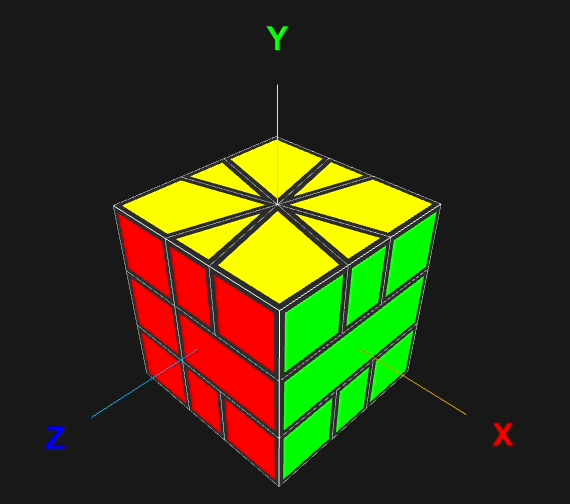
Script Your SQ-1 is an interactive 3D Square-1 puzzle visualizer and script player. Create, visualize, and animate SQ-1 algorithms and tutorials in real-time.
Camera Controls
- Rotate: Click and drag on the puzzle
- Zoom: Scroll with mouse wheel or pinch on trackpad
Move Sequences
Enter standard SQ-1 move notations made of two elements:
(top, bottom)- Numbers represent 30° increments. Positive = clockwise, Negative = counter-clockwise when facing that layer/- Slice move that flips the right half
Example: (1,0) / (3,-3) / (0,2) / means a series of moves: turn the top layer 30°
clockwise, flip the right half (slice), simultaneously turn the top 90° clockwise and bottom 90°
counter-clockwise,
slice, and so on.
Script Player
Write scripts to create animated tutorials with descriptions, camera movements, piece highlighting, etc.
If writing YAML seems too technical, try the AI Script Generator below!
Or, check out this introduction if you want to learn about YAML in the quickest way.
Script Format
Scripts use YAML format with the following structure:
version: 1
ops:
  - type: operation_type
    args: ...
  - type: another_operation
    args: ...
Root Keys
version(optional): Integer specifying script syntax version (default: 1)ops(optional): Array of operations to execute sequentially
Operation Types
1. Wait (wait)
Pause for a specified duration.
- type: wait
  args: 0.5  # seconds
2. Move Camera (camera)
Move the camera to a new position and orientation.
- type: camera
  args:
    position: [0, 2, 6]     # [x, y, z] coordinates
    look_at: [0, 0, 0]      # point to look at
    duration: 2             # seconds (0 = instant)
3. Set Animation Speed (animation_speed)
Adjust puzzle animation speed.
- type: animation_speed
  args:
    layer_turning: 0.1  # radians per frame (optional)
    slicing: 0.15       # radians per frame (optional)
A reasonable number to start with is 0.05
4. Execute Move Sequence (seq)
Execute SQ-1 moves using standard notation.
- type: seq
  args:
    seq_str: "/ (3,-3) / (-3,3) /"
5. Highlight Pieces (hl_piece)
Highlight specific pieces with animations.
- type: hl_piece
  args:
    - piece_name: UBR
      animation: highlight  # or flash_hl, flash, restore
    - piece_name: EL
      animation: flash
Animation types:
highlight- Highlight and keep highlightedflash_hl- Flash then stay highlightedflash- Flash then return to original colorrestore- Restore original piece color
Piece names:
- Edges:
UB, UR, UF, UL, DB, DR, DF, DL - Corners:
UBR, UFR, UFL, UBL, DBR, DFR, DFL, DBL - Middle layer pieces:
EL, ER
The symbols represent positions in the initial state:
U (Up), D (Down), L (Left), R (Right), F
(Front), B (Back)
For example, UBR is the top layer (U) corner piece in the Back-Right position.
EL is the middle layer piece that won't be flipped during slicing, and ER is the one
that
will.
6. Highlight Stickers (hl_sticker)
Highlight specific stickers on pieces.
- type: hl_sticker
  args:
    - sticker_name: UBR-R
      animation: flash  # or restore, remove
    - sticker_name: EL-F
      animation: remove
Animation types:
remove- Change sticker to piece color (hide it)restore- Restore original sticker colorflash- Flash between piece and sticker color
Sticker name format: piece_name-face
Faces: U (Up), D (Down), L (Left), R (Right), F
(Front), B (Back). These refer to the initial orientation, not where the sticker currently faces.
Example: UBR-R is the Right face sticker of the UBR corner piece
Complete Example
version: 1
ops:
  - type: animation_speed
    args:
      slicing: 0.3
  - type: seq
    args:
      seq_str: "/(3,0)/(-5,6)/(0,-2)/"
  - type: camera
    args:
      position: [0, 2, 6]
      look_at: [0, 0, 0]
      duration: 2
  - type: hl_piece
    args:
      - piece_name: EL
        animation: highlight
      - piece_name: UBR
        animation: highlight
  - type: wait
    args: 0.5
  - type: seq
    args:
      seq_str: "(0,1)"
  - type: hl_piece
    args:
      - piece_name: EL
        animation: restore
  - type: hl_sticker
    args:
      - sticker_name: EL-F
        animation: remove
      - sticker_name: ER-F
        animation: remove
AI Script Generator
Don't want to write YAML manually? Use this prompt with any AI chatbot (ChatGPT, Claude, Gemini, etc.) to generate scripts using natural language!
How to Use
- Copy the prompt below - Click the Copy button
- Paste into any AI chat - ChatGPT, Claude, Gemini, or any LLM service
- Describe what you want - Use natural language like: "Make the puzzle do a slice move, highlight the top-right corner, wait 1 second, then rotate the camera"
- Copy the generated YAML - The AI will create a valid script you can paste into the Script Player
AI Prompt
Auxiliary Information
Coordinate System